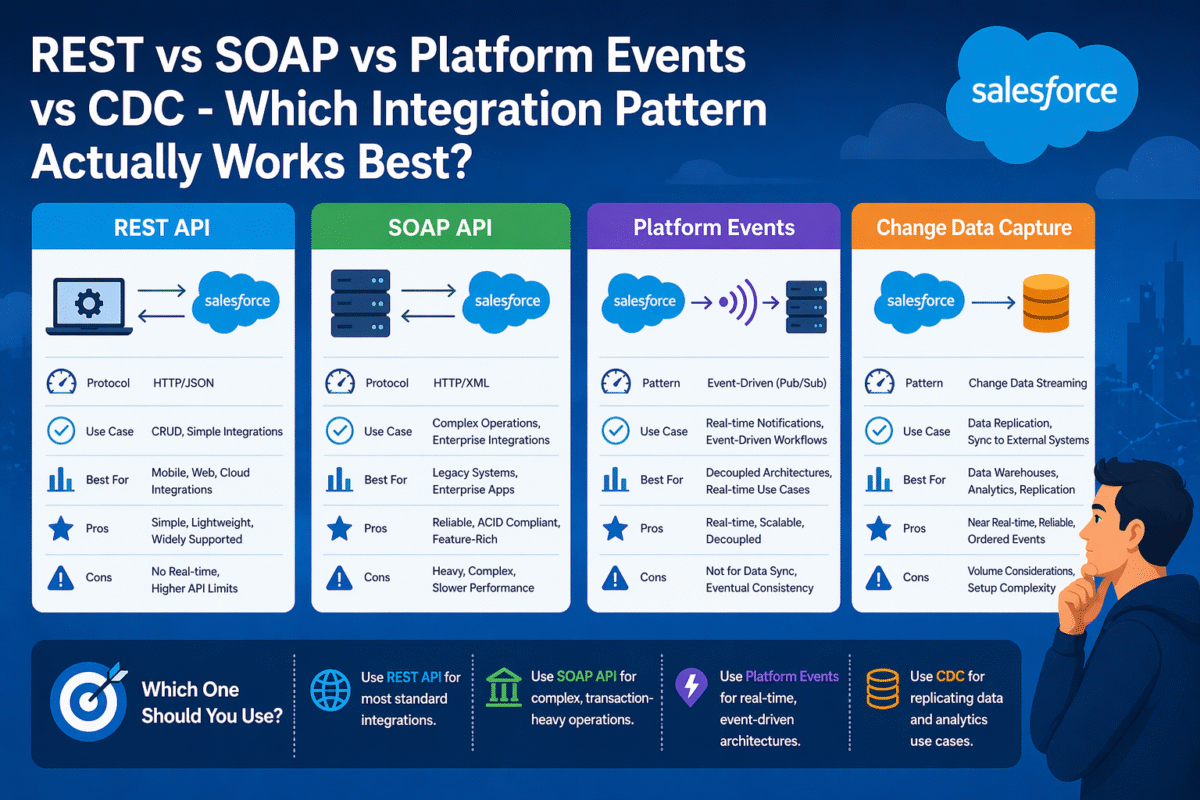
Every Salesforce integration decision is a tradeoff between simplicity, real-time capability, scalability, and coupling. REST API, SOAP API, Platform Events, and Change Data Capture are not interchangeable – each pattern exists because the others cannot solve the problem it was designed for. Choosing correctly from the start determines whether your integration is maintainable in two years or a source of production incidents.
The Four Patterns at a Glance
| Pattern | Direction | Real-Time | Decoupled | Best For |
| REST API | Both | ✓ | ✗ | CRUD, queries, external-triggered |
| SOAP API | Both | ✓ | ✗ | Legacy ERP, strict schema contracts |
| Platform Events | Publish/Subscribe | ✓ | ✓ | Event-driven workflows, notifications |
| Change Data Capture | Outbound only | ✓ | ✓ | Syncing Salesforce changes to external systems |
🔗REST API
Request / Response · Synchronous · Both Directions
Salesforce’s REST API exposes every standard and custom object through HTTP endpoints. External systems create, read, update, and delete Salesforce records. Salesforce Apex makes callouts to external REST endpoints. It is the most flexible integration pattern and the right default for most requirements.
The core limitation is coupling: the calling system must wait for a response. If the receiving system is slow or unavailable, the integration fails or times out. For high-volume, asynchronous scenarios, REST becomes a bottleneck.
Use When
External system needs to query or update Salesforce records. User-initiated operations that need immediate confirmation. Simple bidirectional data sync with low to moderate volume.
Avoid When
High message volume with potential for burst traffic. Loose coupling is required. The receiving system may be unavailable for periods. You need audit trails of every change automatically.
📄SOAP API
WSDL-Defined · Strict Schema · Legacy Integration
SOAP remains the correct choice when integrating with legacy ERP systems (SAP, Oracle EBS, older Microsoft Dynamics) that expose WSDL-defined interfaces and require typed, schema-validated XML payloads. It provides a contract-first integration model where both sides agree on the exact shape of every message before a single line of code is written.
For greenfield integrations or modern API consumers, REST is preferable. SOAP’s verbose XML, WSDL maintenance overhead, and limited tooling support in modern frameworks make it a legacy integration pattern in most contexts.
Use When
Integrating with legacy ERP that only exposes SOAP endpoints. Strict schema validation is a compliance requirement. Existing enterprise middleware is SOAP-based.
Avoid When
Building new integrations from scratch. The external system supports REST. Developer productivity and tooling simplicity matter.
⚡Platform Events
Publish / Subscribe · Asynchronous · Decoupled
Platform Events implement the publish/subscribe messaging pattern natively on Salesforce. A publisher fires an event and moves on, it does not wait for subscribers to process it. Any number of subscribers (Flows, Apex triggers, external systems) can listen for that event and react independently. This decoupling is the architectural advantage that REST cannot provide.
Platform Events are the right choice for integration scenarios where the source system should not be blocked by downstream processing, where multiple systems need to react to the same business event, or where message delivery and replay capability are required.
Use When
Multiple downstream systems need to react to one business event. Publishing system should not wait for processing. High-volume event streams. Integration resilience matters – events are retained for 72 hours.
Avoid When
Immediate response is required from the subscriber. Simple one-to-one integrations where REST is simpler. External system cannot subscribe to Salesforce streaming API.
🔄Change Data Capture (CDC)
Automatic Change Streaming · Outbound Only · Full Audit
Change Data Capture automatically publishes change events for every create, update, delete, and undelete on enabled Salesforce objects without any code. External systems subscribe to the CDC channel and receive a complete picture of what changed, including the previous field values. This makes CDC the most powerful pattern for keeping external data stores in sync with Salesforce as the system of record.
CDC retains events for 72 hours, supports field-level change detection, and includes header information about what operation triggered the change and which fields were modified. No trigger, no Flow, no custom code required to publish – it is an infrastructure-level capability.
Use When
External data warehouse, data lake, or analytics platform needs to stay in sync with Salesforce. You need a complete audit trail of all field-level changes. High-volume record updates need to propagate to external systems reliably.
Avoid When
You need bidirectional sync (CDC is outbound only). The external system cannot connect to Salesforce Streaming API. You only need to sync specific conditions, not all changes.
The Decision Question Flow
1. Does the external system initiate the action, or does Salesforce? External-initiated → REST or SOAP. Salesforce-initiated → Platform Events or REST callout.
2. Does the operation need an immediate response? Yes → REST. No → Platform Events for decoupling.
3. Are you syncing Salesforce record changes to an external store? Yes → Change Data Capture first. It requires no custom code and captures everything.
4. Is the integration with a legacy ERP using WSDL? Yes → SOAP. Everything else → REST.
5. Do multiple systems need to react to the same event? Yes → Platform Events, not REST to each system individually.
Hokoriam Integrates Salesforce with Any System
Our team has connected Salesforce to ERPs, payment gateways, warehouse management systems, e-commerce platforms, and custom internal tools. We design the integration architecture before writing a line of code choosing the right pattern for each data flow so your integrations are maintainable, not just functional.